
友情链接:
Contact us Chinese English Alibaba
DYLINK new technologyNational High-Tech Enterprise
Service Hotline0755 86120002


Service Hotline0755 86120002


分类:KVM switch
描述:
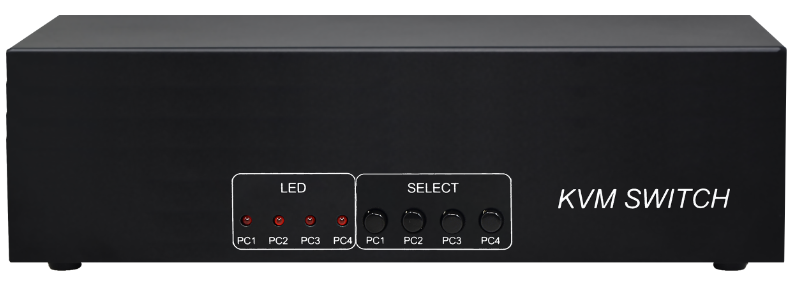
product descriptionKVM Multi-Computer Switcher;1.This system enables users to swiftly switch between four computer hosts using a single USB keyboard, mouse, and VGA video interface, facilitating efficient multitasking.2.Video resolution-up to 1920 x 1440. Users can enjoy a wider screen0755 86120002

KVM Multi-Computer Switcher;
1. This system enables users to swiftly switch between four computer hosts using a single USB keyboard, mouse, and VGA video interface, facilitating efficient multitasking.
2. Video resolution-up to 1920 x 1440. Users can enjoy a wider screen display and provide the best working experience.
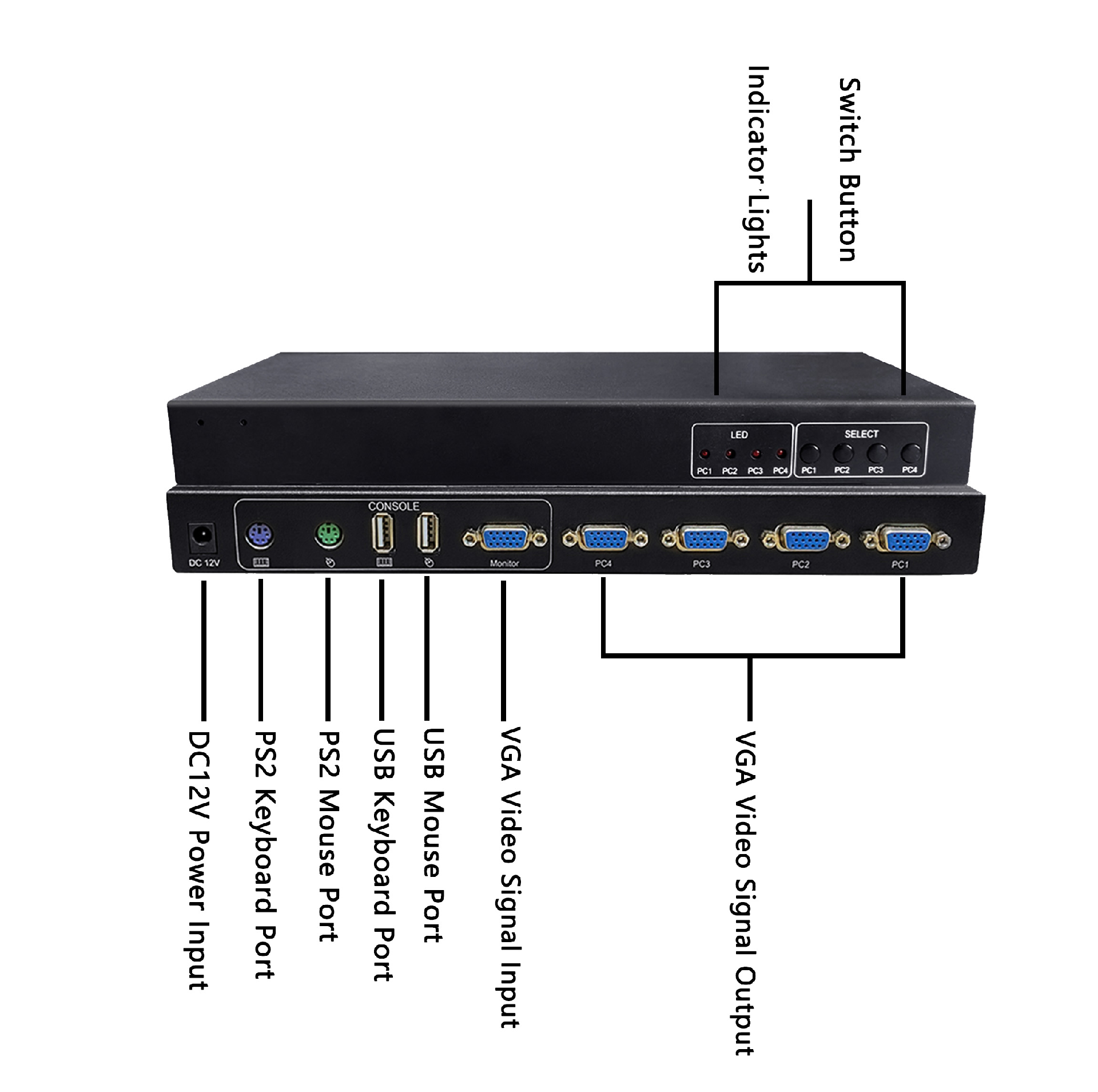
3. The KVM switch enables seamless switching between four computers and features two USB ports. Both USB keyboard and mouse data are transmitted via KVM cables for rapid, seamless switching, while also providing PS2 keyboard and mouse for users to use simultaneously.
4. The device is easy to install and use, requiring only cable insertion into its designated ports. No software configuration is needed, and compatibility issues are eliminated. It works seamlessly across multiple operating systems including Windows, Linux, and Mac.
1. PC: 4 KVMUSB cables
2. User interface: a monitor with VGA port; a USB keyboard and mouse; a PS2 keyboard and mouse.

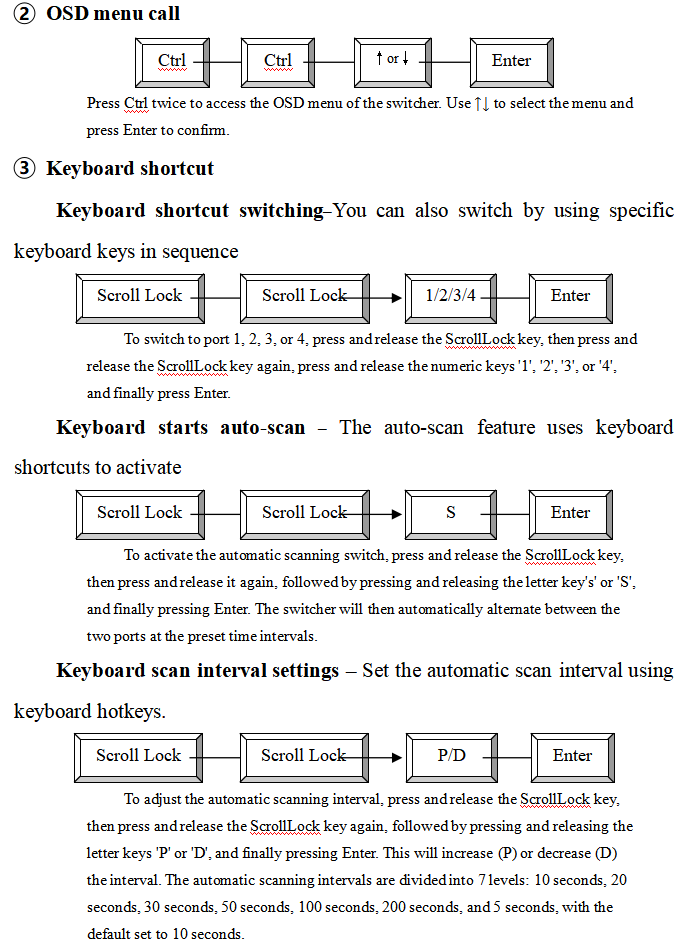
l It offers three switching modes: front panel buttons, keyboard shortcuts, and OSD menu.
l Provide multiple automatic scanning modes and scanning times;
l Hot-swapping-Add or remove connected computers without powering them off.
l Control and manage four computers through a USB keyboard, mouse (or PS2 keyboard, mouse), and display controller.
l Supports cascading-manage more computers
l High video resolution-up to 1920 × 1440
The front panel has four buttons. Pressing any one of them switches to one of the four ports.
container loading list
Thank you for using our products. Before opening the packaging, please check the product packing list.
Product packing list:
√ SW2401R-D one
√ KVMUSB cable Four
√ 12V/1A power adapter one
√ operating instruction a part
√ Warranty card certificate One copy each
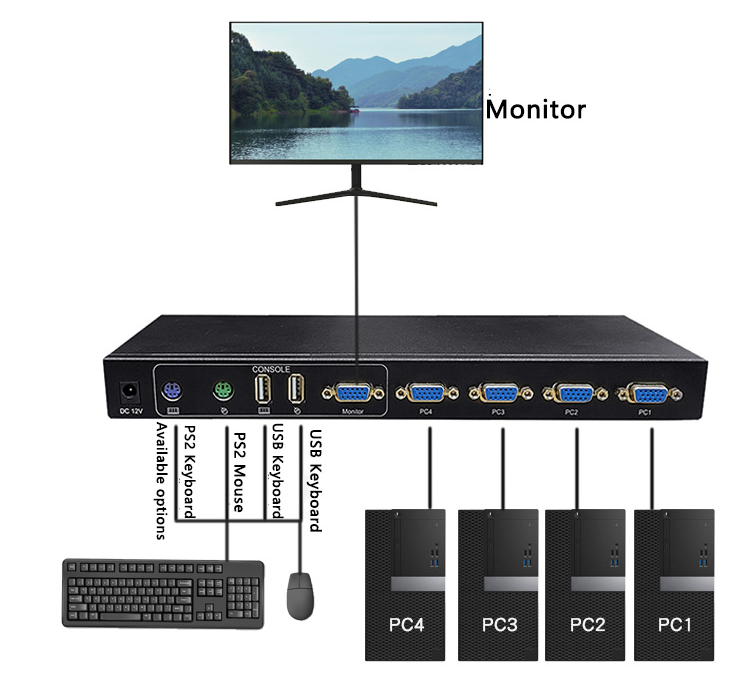
1) Turn off the switch, VGA monitor, and all hosts
2) Insert the USB keyboard and USB mouse into the ports labeled as keyboard and mouse on the switch.
3) Insert the VGA monitor into the switch port labeled "Monitor" and turn on the monitor power.
4) Use a KVMUSB cable to connect the VGA port on the switcher to the host's VGA port.
5) Connect the switcher's USB port to the host's USB port using a USB cable.
6) Power on the switch.
7) Turn on all computer power and start
SW2401R-D | |
Number of connected computers | 4 |
Computer connection port | HDB15 female head |
User terminal connection port | Display HDB15 female connector |
USB Type-A keyboard and PS2 port | |
USB Type-A mouse and PS2 port | |
cascade system | Tree-level cascading, using KVM cables |
port select | Keys, keyboard shortcuts, OSD menu |
LED pilot lamp | 4 |
Video resolution | 1920 x 1440 |
Auto Scan Interval | Optional, 5-200 seconds |
source | External power supply, DC12V/1A |
working temperature | -40℃~85℃ |
Working humidity | 0%–80% RH non-condensing |
hull | metal |
Size (length x width x height) | 280x115x30(mm) |
 DYLINK new technology
 0755 86120002
 liyj@dayapc.com
 13316531915
 West 2nd Floor, Building B, No. 91, Ma Hom South Road, Ma Hom Community, Xili Street, Nanshan District, Shenzhen
  公众号二维码
公众号二维码
业务主管
业务经理
业务经理
业务经理
售后